Menu Builder
We import the standard menus from StarChef. These will then need customising for each of your schools. To get started, click 'Menus' then ‘Menu Builder’
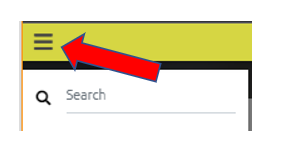
When menus are imported from StarChef, they are created at 'contract' level. Before you can begin editing a menu, you need to make a copy of it at one of your schools. To do that, click the 3 lines top left (the 'Hamburger' menu) and select the contract (e.g. EN_National).
Once you have a contract selected, find the menu you want to copy using the 'Menus' dropdown. Once the menu is shown, click 'Copy'. You will be shown a list of your schools. Any school which already has a copy of the selected menu will not be shown - this is so that you don't accidentally overwrite a school's copy of the menu.
Select a school and click 'Copy'. The menu will then be copied to the school - wait for a 'success' message to be shown.
You can then use the 'Hamburger' menu to select the school you just copied the menu to.
Once you have selected the school, you will be presented with the screen below, with your school’s name showing in the top left-hand side of the screen.
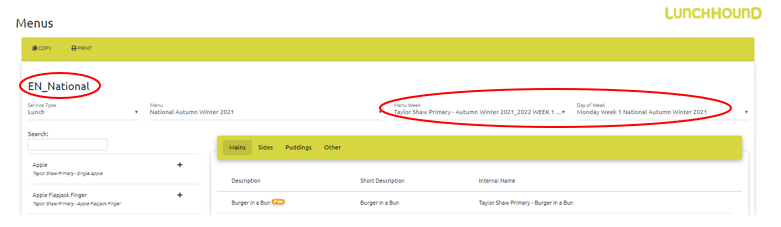
You will now be able to customise the recipes available for each day. Use the rightmost two dropdowns to select the week and day you want to edit.

To add a recipe to the selected day, click on the search box (top left) and type the chosen recipe, once the chosen recipe is showing under the search box click the plus sign (+) this will then be added to the menu (far right)
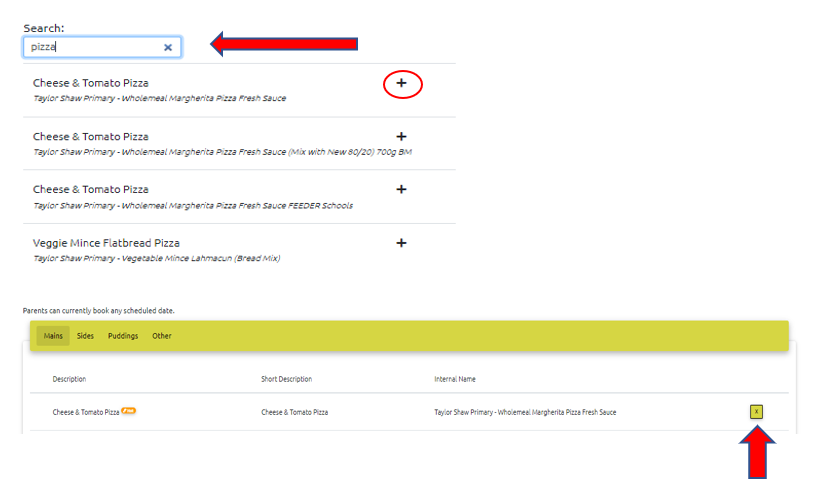
You will now be able to see your chosen recipe has been added to the menu.
To remove a recipe from the menu, click the 'X' button on the right hand side, as shown above.
Theme Days
If your chosen school has decided to hold a theme day (i.e. Chinese New Year / World Book Day) etc, the only differences are as follows.

Your dropdown options will need to be changed to;
- Menu – National Theme Days
- Menu Week – Theme Days (2021-2022)
- Day of the week – (Themed Day chosen i.e. Chinese New Year etc)
Once this is done you will be able to schedule your menu as noted above.
Once you are happy with your menu choices you will then need to use the Menu Dates Scheduler to schedule which menus are shown on which dates. (Please refer to the Menu Management > Menu Dates) article.